 EN ▾
A fraction in three steps
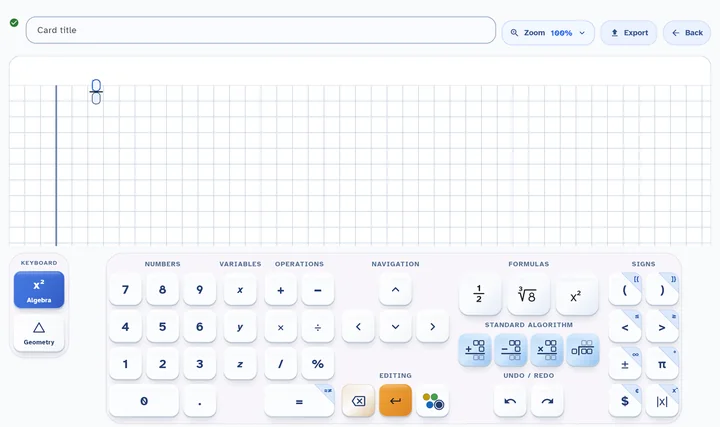
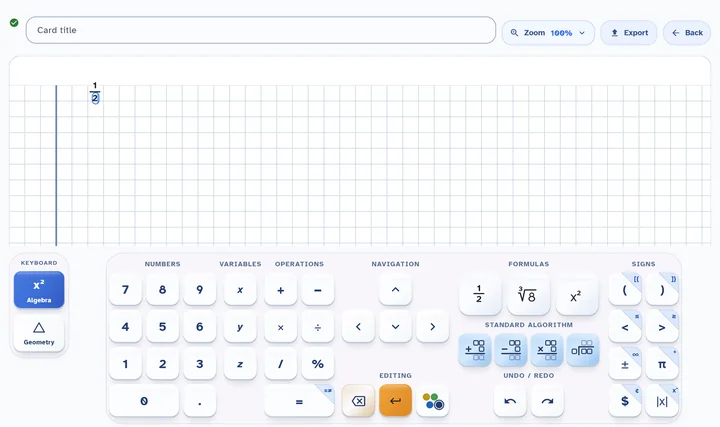
- 1Put the cursor where the fraction belongs and tap the fraction button.
- 2Type the numerator in the top box, for example 1.
- 3Press the down arrow, type the denominator, for example 2, then use the right arrow to keep writing.
Fix one part without rewriting the page
If a digit or sign is wrong, move back to its box with the arrows and change just that entry. MathIt does not calculate or simplify fractions for your child.
What MathIt does
MathIt is a math notebook for Android tablets. It keeps the parts of a fraction in their places, but your child chooses every number, sign and method.
MathIt is designed for Android tablets with a screen of 7 inches or more.
Frequently asked questions
Does MathIt calculate fractions?
No. It gives the fraction its structure but does not calculate, simplify or check an answer.
How do I move to the denominator?
After inserting a fraction, press the down arrow. The right arrow leaves the fraction so you can keep writing.
Can my child hand in the finished work as a PDF?
Yes. Tap Export, choose PDF, pick a folder in Android and save the file. How to hand in homework as a PDF.
The screenshots show the English version of MathIt. The app also has a built-in formulas tutorial that shows how to insert and complete a fraction.